Registration and attendees · Event staff
Printable registration form
Print a paper form based on the configured registration fields.Printable registration form
Print a paper form based on the configured registration fields.
Who can use this: Event staff. Available actions can vary with the event's enabled features and your assigned role.
Open this page
- Sign in as an event manager.
- Select Events, choose the event, then select Edit event.
- Select Registration Form, then use the printable form action.
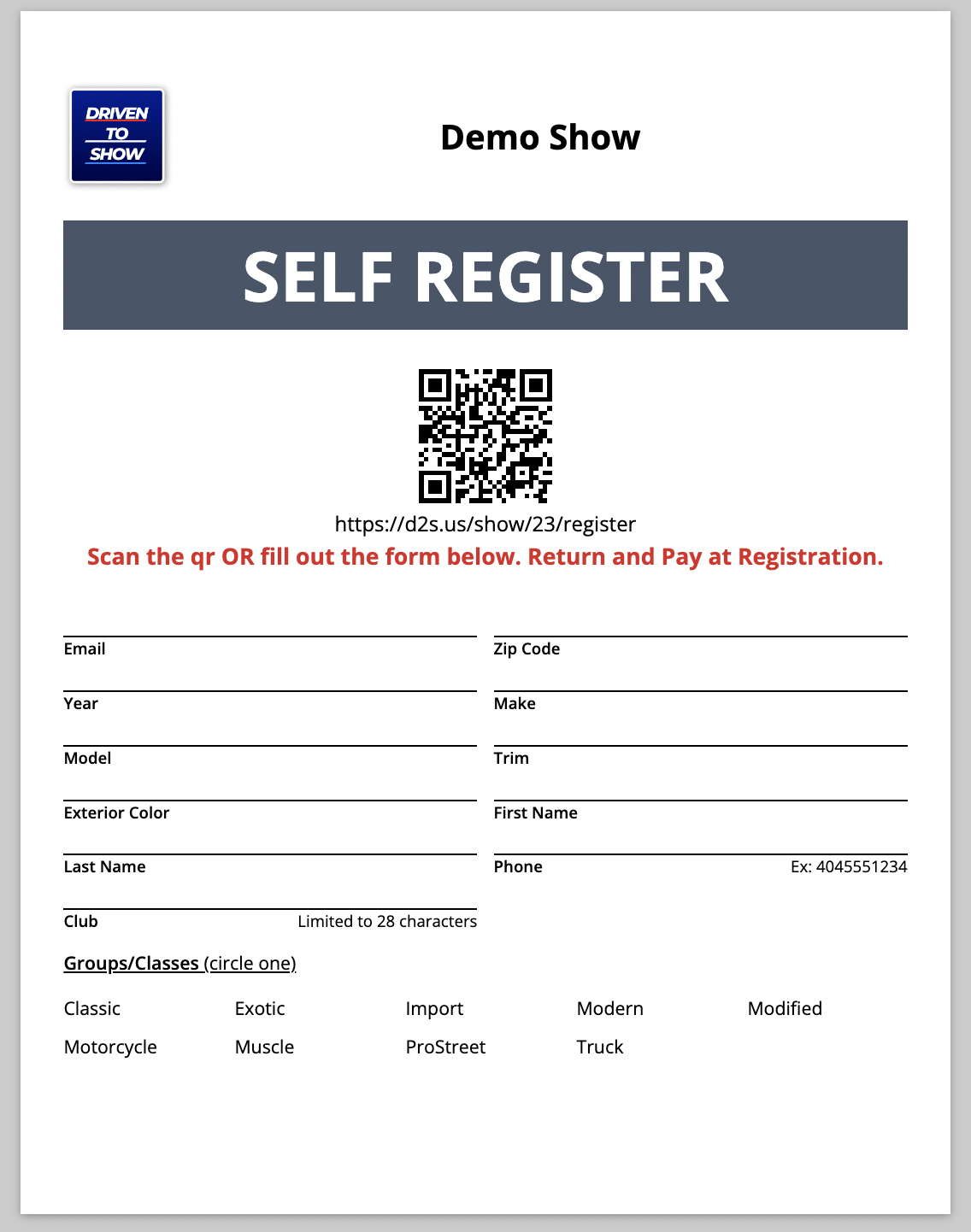
When an attendee does not want to self-registrations via an internet connected device but instead by physically writing their information down on a piece of paper using the Printed Registration form is an easy way to help them. Print the printable registration form have the attendee fill out the paper form then a staff member will enter their information into the system.
Managers will be able to access the print form by doing the following:
- Log into DrivenToShow.com
- Click Events
- Click on your event
- Click Attendees
- Click "Paper Form" in the upper right corner (yellow button). A new page will open with the registration form fields.
Notes:
- The organization logo can be added to this form by adding it on the Edit Details page.
- The form is generated based on the registration form.
- Groups/Classes are generated based on the Groups/Classes added to the show.
Example form:
Last reviewed against the current Driven To Show application: August 2026.